
Introduction
In this post we will continue our journey for building database container images, in the previous post we built an image for PostgreSQL and in this one it is SQL Server turn!!
This time we will follow a different approach by building a more complex deployment for SQL Server, by adding high availability flavour to our solution. We will build two SQL Server containers that acts as physical high availability nodes and then will build what is called availability group on top of these two nodes.
AlwaysOn availability groups “AG” is the high availability “HA” solution developed inside SQL Server and available since SQL Server 2012 and will be used in our environment.
We will also add to our environment some security and networking practices that are required for AGs setup like certificates and docker network and we will use Docker Compose to orchestrate our containers using a pre-existing image..
Finally, we will add a health-check process to monitor SQL Server health as part of each node “container” deployment.
Source Code:
https://github.com/NaderSH/Container101forDBAs-SQLServer
The Basic Image
Before we start building our high availability solution, we will build and deploy first a basic SQL Server container using docker compose, as it can also be used to build basic containers as well as multi-containers environments like what we are going to build today.
In this step what we are going to do is to import the basic SQL Server image from Microsoft Artifact Registry, then define the container name, SA password and ports mapping.
The docker compose file for basic standalone SQL Server
# docker-compose.yml
services:
  sql-test:
    image: mcr.microsoft.com/mssql/server:2022-latest
    platform: linux/amd64
    container_name: sql-test
    environment:
      - ACCEPT_EULA=Y
      - SA_PASSWORD=YourStrong!Password
    ports:
      - "1400:1433"
In order to deploy this docker-compose file and deploy the image, we need to execute the below commands:
# Step 1- Deploy SQL Server Container
docker compose up -d

# Step 2- Check the deployment status
# 2.1- Check deployed image
docker image ls
# 2.2- Check deployed containers
docker ps
# or
docker container ls

# Step 3- Connect to SQL Server
sqlcmd -S localhost,1400 -U sa -P 'YourStrong!Password' -Q "SELECT @@SERVERNAME" -C

# Step 4- Check container's logs "in case of failure/errors"
docker logs sql-test
Now, we are going to move forward and build our HA environment on SQL Server based on AlwaysOn Availability Groups for a containerized environment:
The solution design
The below architecture shows how availability groups works as a high availability solution, and it is important for anybody who will go to build this solution to know some information about how this high availability system works:
- First thing we should have two SQL Server instances running separately on two containers (sqlnode1 and sqlnode2).
- Each container will have an attached volume that holds SQL Server data (sql1_data for sqlnode1 and sql2_data for sqlnode2).
- Each container will have more than one bind mount for mounting all required scripts that will be used during the build process to build the availability groups on both nodes (init-primary.sh & init-secondary.sh).
- There are also bind mounts for SQL Server certificates directory ” certs”, which is required on both containers for implementing the authentication and data synchronization process between the two nodes.

The setup process

So, the process simply starts by executing the docker-compose.yml file, which will:
- Process the docker-compose.yml file with version 3.8.
- Pull the SQL Server image from Microsoft docker repository “if it does not exists locally on your machine”.
- Create all prerequisites for building the containers, which includes:
2.1. Create Network.
2.2. Create Volumes. - Create the two containers for primary and secondary AG nodes, and:
4.1. Assign them IP addresses and hostnames.
4.2. Set all required environment variables, e.g. $SA_PASSWORD.
4.3. Perform ports mapping “between container’s ports and local ones”.
4.4. Connect volumes and bind mounts to containers.
4.5. Start executing initialization scripts “init-primary.sh & init-secondary.sh” - By performing step 4.5, the AG starts to be created on both primary and secondary nodes, this step includes smaller steps being applied on both SQL Servers:
5.1. Create database master key “DMK” on master DB on both nodes.
5.2. Create certificate on primary node, restore it on secondary node.
5.3. Create HADR endpoint for data synchorinization between the two nodes.
5.4. Create the availability group “AG” on primary node, joining it by secondary node.
5.5. Create the availability group listener on primary node.
The final structure of our solution should looks like the below one:
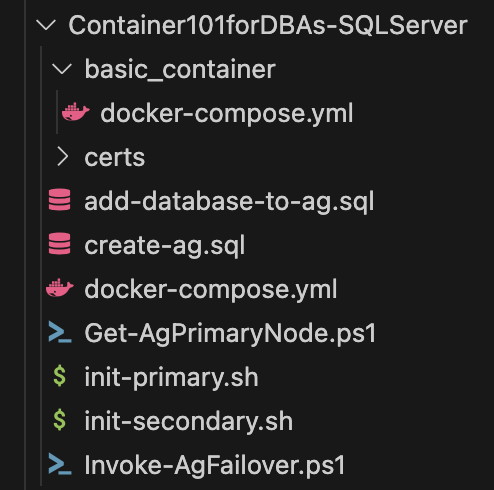
And below another diagram representing the relationship between the solution files, so after the docker-compose.yml file finishes the containers related work, it will start in parallel to execute both init-primary.sh and init-secondary.sh, while all SQL scripts required to be executed on secondary are imbedded inside init-secondary.sh, SQL scripts executed on primary are being stored in a dedicated SQL file “create-objects-ag.sql“.
The files add-database-to-ag.sql , Get-AgPrimaryNode.ps1 & Invoke-AgFailover.ps1 are not part of the deployment itself, and will be executed after having the AG completely configured.

Why to use docker compose
We mentioned before the docker compose option for building and managing multi-container applications in post Building your First Database Container, and in our case we need to build at least two SQL Server containers that will act as SQL Server availability group nodes “primary and secondary node” – like any classical database high availability solution.
Also docker compose configures automatically the dedicated virtual network required for the two nodes to interact and communicate with each other using their service names as hostnames, which is a requirement for setting up the AG replication endpoints.
What is AG replication endpoint
An Availability Group (AG) replication endpoint is a dedicated communication channel that allows SQL Server instances to securely send and receive data for an Always On Availability Group. Think of it as a specific “door” on each server that is used exclusively for AG traffic.
Each SQL Server instance that participates in an availability group (acting as a primary or secondary replica) must have one of these endpoints.
The main purpose of endpoints are to manage data synchronization among AG nodes, to authenticate among these nodes and also to encrypt the data being transmitted among these nodes.
The data encryption is being handled by certificates that encrypt/decrypt the data being synchronized from the primary node to all secondary nodes “this is a very simplified description for how the authentication and encrypted data synchronization processes are being implemented”.
The default port for AG replication endpoint is 5022 and it should be configured on each AG node.
Why to use certificates
As mentioned, certificates are used mainly to secure the data synchronization process by encrypting and decrypting the data sent from primary to secondaries, however for our containerized environment certificates have another critical role which is the authentication process itself.
In traditional Windows-based SQL Server environments, the authentication process among AG nodes is performed via Windows authentication as Active Directory users, however as we run our environment as a containerized one, then the certificate has another role beside encryption which is authentication.
The docker compose file for SQL Server AG
# docker-compose.yml

services:
  sql1:
    image: mcr.microsoft.com/mssql/server:2022-latest
    container_name: sqlnode1
    hostname: sqlnode1
    environment:
      - ACCEPT_EULA=Y
      - SA_PASSWORD=YourStrong!Password
    ports:
      - "1401:1433"
    volumes:
      - sql1_data:/var/opt/mssql
      - ./certs:/certs
      - ./init-primary.sh:/usr/src/app/init-primary.sh
      - ./create-ag.sql:/usr/src/app/create-ag.sql
    command: /bin/bash /usr/src/app/init-primary.sh
    networks:
      - sql_ag_net
    healthcheck:
      test: ["CMD", "/opt/mssql-tools/bin/sqlcmd", "-S", "localhost", "-U", "sa", "-P", "YourStrong!Password", "-Q", "SELECT 1;"]
      interval: 10s
      timeout: 5s
      retries: 5
      start_period: 20s

  sql2:
    image: mcr.microsoft.com/mssql/server:2022-latest
    container_name: sqlnode2
    hostname: sqlnode2
    environment:
      - ACCEPT_EULA=Y
      - SA_PASSWORD=YourStrong!Password
    ports:
      - "1402:1433"
    volumes:
      - sql2_data:/var/opt/mssql
      - ./certs:/certs
      - ./init-secondary.sh:/usr/src/app/init-secondary.sh
    command: /bin/bash /usr/src/app/init-secondary.sh
    networks:
      - sql_ag_net
    healthcheck:
      test: ["CMD", "/opt/mssql-tools/bin/sqlcmd", "-S", "localhost", "-U", "sa", "-P", "YourStrong!Password", "-Q", "SELECT 1;"]
      interval: 10s
      timeout: 5s
      retries: 5
      start_period: 20s

networks:
  sql_ag_net:
    driver: bridge

volumes:
  sql1_data:
  sql2_data:
This is how the docker-compose file looks like:
services: This is the most important section. It defines each of the individual containers that make the application (sqlnode1andsqlnode2).networks: Defines the virtual networks the containers will use to communicate with each other. In our case, it creates a private network namedsql_ag_net.volumes: Defines the persistent data storage. This ensures that SQL Server data (sql1_data,sql2_data) and the shared certificate (certs) are not lost when the containers are stopped or removed.
Inside the services block, each service has its own set of keys that define how its container should be built and run:
-
image: The Docker image to use for creating the container (e.g.,mcr.microsoft.com/mssql/server:2022-latest). -
container_name: A specific name for the container (sqlnode1). -
hostname: The network hostname inside the Docker network. This is crucial as SQL Server uses this name to identify replicas. -
environment: Sets environment variables inside the container. We use this for accepting the EULA and setting theSA_PASSWORD. -
ports: Maps ports between the local machine (host) and the container. For example,"1401:1433"maps port1401on local machine to port1433inside thesql1node1container. -
volumes: Mounts directories or named volumes into the container. For example,sql1_data:/var/opt/mssqllinks the named volumesql1_datato the SQL Server data directory inside the container. -
networks: Attaches the service to one of the defined networks and can assign a static IP address. -
command: Overrides the default command that the image runs. We use it to execute our initialization script (/bin/bash /usr/src/app/init-primary.sh).
The init-primary & create-ag files
The init-primary.sh file is responsible for creating the availability group by executing SQL file create-ag.sql then it creates a flag to give a sign to the secondary node to start joining availability group as a secondary node “which is a part of init-secondary.sh file”.
The following are the steps executed inside init-primary file:
- Define environment variables: the variables will be used during script execution.
-
Wait for SQL Server service to be in ready state: running inside a loop, checking connectivity to SQL Server, and break when the connectivity is possible.
-
Run the consolidated setup script to create AG: this step includes all the steps required for building the availability group by executing file “create-ag.sql“, which performs the following operations:3.1. Create database master key for encrypting the certificates.3.2. Create/backup certificates.3.3. Create HADR endpoints.
3.4. Create availability group “AG”.
3.5. Create availability group listener. - Create a flag that indicate that the availability group build on primary is done and the secondaries can join now “this flag will be used by the init-secondary.sh file”.
- Keep the container in running state.
init-primary.sh
#!/bin/bash
# init-primary.sh

# Step 1- Define environment variables
SA_PASSWORD='YourStrong!Password' # !!! CHANGE THIS !!!
SQLCMD="/opt/mssql-tools/bin/sqlcmd"
SQLCMD_ARGS="-S localhost -U sa -P $SA_PASSWORD"

# Step 2- Wait for SQL Server service to be in ready state
echo "Waiting for SQL Server on sqlnode1 to be ready..."
until $SQLCMD $SQLCMD_ARGS -Q "SELECT 1;" &>/dev/null; do
    echo -n .
    sleep 2
done

echo "SQL Server on sqlnode1 is ready!"
echo "Configuring Primary Replica and AG!"

# Step 3- Run the consolidated setup script to create AG
$SQLCMD $SQLCMD_ARGS -i /usr/src/app/create-ag.sql

# Step 4- Create a flag file to signal that the primary is configured and cert is ready
touch /certs/primary_ready.flag
echo "Primary setup complete. Flag file created."

# Step 5- Keep the container running
tail -f /dev/null
-- create-ag.sql
USE [master];
GO
-- 1. Create and backup the certificate for endpoint authentication
CREATE MASTER KEY ENCRYPTION BY PASSWORD = 'YourStrong!Password';
GO
CREATE CERTIFICATE ag_certificate WITH SUBJECT = 'AG Certificate for Demo';
GO
BACKUP CERTIFICATE ag_certificate
TO FILE = '/certs/ag_certificate.cer'
WITH PRIVATE KEY (
FILE = '/certs/ag_certificate.key',
ENCRYPTION BY PASSWORD = 'YourStrong!Password'
);
GO
-- 2. Create the HADR endpoint
CREATE ENDPOINT [Hadr_endpoint]
STATE=STARTED
AS TCP (LISTENER_PORT = 5022, LISTENER_IP = ALL)
FOR DATA_MIRRORING (
ROLE = ALL,
AUTHENTICATION = CERTIFICATE ag_certificate,
ENCRYPTION = REQUIRED ALGORITHM AES
);
GO
-- 3. Create the Availability Group
CREATE AVAILABILITY GROUP [MyAG]
WITH (
CLUSTER_TYPE = NONE
)
FOR REPLICA ON
N'sqlnode1' WITH (
ENDPOINT_URL = N'tcp://sqlnode1:5022',
AVAILABILITY_MODE = SYNCHRONOUS_COMMIT,
FAILOVER_MODE = MANUAL, -- MANUAL is appropriate for traditional cluster-less AGs
SEEDING_MODE = AUTOMATIC,
SECONDARY_ROLE (ALLOW_CONNECTIONS = ALL)
),
N'sqlnode2' WITH (
ENDPOINT_URL = N'tcp://sqlnode2:5022',
AVAILABILITY_MODE = SYNCHRONOUS_COMMIT,
FAILOVER_MODE = MANUAL,
SEEDING_MODE = AUTOMATIC,
SECONDARY_ROLE (ALLOW_CONNECTIONS = ALL)
);
GO
-- 4. Create the Listener
ALTER AVAILABILITY GROUP [MyAG]
ADD LISTENER N'MyAGListener' (PORT = 1433);
GO
PRINT 'AG and Listener created successfully.';
The init-secondary file
The init-secondary.sh file is responsible for joining the secondary node “container” to the availability group created at the primary side while executing file “init-primary.sh” file.
The logic inside init-secondary is to wait for the AG installation on primary node “container” to be ready then start executing.
The following are the steps executed inside init-secondary file:
- Create database master key for encrypting the certificates.
- Create certificate from the backup for the primary node certificate.
- Create the HADR endpoint.
- Join the availability group “AG”.
- Keep the container in running state.
init-secondary.sh
#!/bin/bash
# init-secondary.sh

# Step 1- Define environment variables
SA_PASSWORD='YourStrong!Password' # !!! CHANGE THIS !!!
SQLCMD="/opt/mssql-tools/bin/sqlcmd"
SQLCMD_ARGS="-S localhost -U sa -P $SA_PASSWORD"

# Step 2- Wait for SQL Server service to be in ready state
echo "Waiting for SQL Server on sqlnode2 to be ready..."
until $SQLCMD $SQLCMD_ARGS -Q "SELECT 1;" &>/dev/null; do
    echo -n .
    sleep 2
done
echo "SQL Server on sqlnode2 is ready!"

# Step 3- Wait for AG primary replica to be configured
echo "⌛ Waiting for primary replica (sqlnode1) to be configured..."
while [ ! -f /certs/primary_ready.flag ]; do
    echo -n .
    sleep 5
done

echo "Primary is ready! Configuring secondary replica..."

#  Step 4- Create the master key
$SQLCMD $SQLCMD_ARGS -Q "CREATE MASTER KEY ENCRYPTION BY PASSWORD = '$SA_PASSWORD';"

# Create the certificate from the backup on the shared volume
$SQLCMD $SQLCMD_ARGS -Q "CREATE CERTIFICATE ag_certificate FROM FILE = '/certs/ag_certificate.cer' WITH PRIVATE KEY (FILE = '/certs/ag_certificate.key', DECRYPTION BY PASSWORD = '$SA_PASSWORD');"

# Create the HADR endpoint
$SQLCMD $SQLCMD_ARGS -Q "CREATE ENDPOINT [Hadr_endpoint] STATE=STARTED AS TCP (LISTENER_PORT = 5022, LISTENER_IP = ALL) FOR DATA_MIRRORING (ROLE = ALL, AUTHENTICATION = CERTIFICATE ag_certificate, ENCRYPTION = REQUIRED ALGORITHM AES);"

# Join the Availability Group
$SQLCMD $SQLCMD_ARGS -Q "ALTER AVAILABILITY GROUP [MyAG] JOIN WITH (CLUSTER_TYPE = NONE);"
$SQLCMD $SQLCMD_ARGS -Q "ALTER AVAILABILITY GROUP [MyAG] GRANT CREATE ANY DATABASE;"

echo "Secondary setup complete."

# Keep the container running
tail -f /dev/null
The Execution
We just need to execute docker compose up command to start deploying our environment, then we can perform some checks to make sure that everything there is working as expected:
# Step 1- Deploy SQL Server AG Environment
docker compose up -d

# Step 2- Check the deployment status
# 2.1- Check deployed image
docker image ls
# 2.2- Check deployed volumes
docker volume ls
# 2.3- Check deployed containers
docker ps
# or
docker container ls

# Step 3- Connect to SQL Server on both containers
sqlcmd -S localhost,1401 -U sa -P 'YourStrong!Password' -Q "SELECT @@SERVERNAME" -C
sqlcmd -S localhost,1402 -U sa -P 'YourStrong!Password' -Q "SELECT @@SERVERNAME" -C

# Step 4- Check container's logs "in case of failure/errors"
docker logs sqlnode1
docker logs sqlnode2
Basic Operations on Availability Groups
Now, after having our environment deployed, we can perform some operations like creating databases, performing failover and check which node is the current primary node.
The Availability Group Listener
In real production environment, there should be a dedicated IP/DNS for the AG listener that allows applications to connect to the AG as a single point of contact, so when a failover occur it remain transparent to applications without the need to change their connection string.
However, for a demo environment purpose like the one we are building here, there is no dedicated IP defined for the listener and in such case we are able to connect to the primary and secondary nodes themselves and not to the listener itself.
In such scenario we still have the need to determine which container is the current primary, and there are many ways to perform this check and one of the most common solutions is to query the two nodes and determine the primary node based on this query result.
Below is the simplest query that can provide this information, executing this agains the AG nodes will return result only from the primary node:
-- Primary Identifier Query
SELECT @@SERVERNAME
FROM sys.dm_hadr_availability_replica_states
WHERE role = 1;
This query can be encapsulated inside a PowerShell function that loops against the AG nodes and execute this query on each node and return back at the end the current primary node name “container name”, which also can be used as an input for another query that uses this output as the current primary node to connect to.
Please note that the PowerShell functions used here are relying on the SQL Server PowerShell module SqlServer, so you have to install and import it before using these PS functions.
Identifying AG Primary Node
# Get-AgPrimaryNode.ps1

function Get-AgPrimaryNode {
    param (
        [string[]]$AgNodes,
        [string]$User,
        [string]$Password,
        [int]$QueryTimeout = 30
    )
    $query = 'SELECT @@SERVERNAME as PrimaryNode
            FROM sys.dm_hadr_availability_replica_states
            WHERE role = 1;'
    foreach ($node in $AgNodes) {
        $primaryNode = (Invoke-Sqlcmd -Query $query -ServerInstance $node -Database 'master' -Username $User -Password $Password -TrustServerCertificate -QueryTimeout $QueryTimeout).PrimaryNode
        if ($primaryNode -ne $null){
            Write-Output($primaryNode)
            break
        }
    }
}
# Function Sourcing
<#
# We need to source the function before execution, this can be done by doing one of the following:
1- Adding it to your PowerShell profile "profile.ps1".
2- Adding the function to your current PS session "path_to_function/\Get-AgPrimaryNode.ps1".
3- Copy/past the function code into your PS session.
Hint:
- For alternative number 2, note that the use for "/" or "\" is based on your OS "whether a Windows or macOS".
#># Function Execution
# 1- We define the list of AG nodes below in variable $agNodes
$agNodes = @('localhost,1401', 'localhost,1402')
# 2- Then execute the function to get the current primary node
Get-AgPrimaryNode -AgNodes $agNodes -User 'sa' -Password 'YourStrong!Password'As mentioned above, we can consider this PS function as our AG primary node identifier and rely on the output to connect to the primary node and perform all required operations like create logins, databases or any other operations.
Create Databases in the Availability Group
Since we are able now to determine which node is the primary, we can simple connect there and create database then join it to the availability group, the below code performs this process:
-- add-database-to-ag.sql
USE master;
GO

CREATE DATABASE MyAGDatabase;
GO
ALTER DATABASE MyAGDatabase SET RECOVERY FULL;
GO

-- A backup is required for seeding to start
BACKUP DATABASE MyAGDatabase TO DISK = '/var/opt/mssql/data/MyAGDatabase.bak';
GO

-- Add the database to the AG. Seeding will happen automatically.
ALTER AVAILABILITY GROUP [MyAG] ADD DATABASE MyAGDatabase;
GO
Performing AG Failover
The following PowerShell function performs a manual failover for the availability group by executing the failover T-SQL command “ALTER AVAILABILITY GROUP [Availability Group Name] FAILOVER;”, it also prepare the secondary node for a manual failover “this is only required for AGs with CLUSTER_TYPE = ‘NONE’ like our case here for AGs running under Linux containers.
# Invoke-AgFailover.ps1

function Invoke-AgFailover {
    param (
        [string[]]$AgNodes,
        [string]$NewPrimary,
        [string]$User,
        [string]$Password,
        [int]$QueryTimeout = 30
    )
    $primaryIdentifierQuery = 'SELECT @@SERVERNAME as PrimaryNode
            FROM sys.dm_hadr_availability_replica_states
            WHERE role = 1;'
    $agNameQuery = 'SELECT name FROM sys.availability_groups;'
    # capture the current primary node
    foreach ($node in $AgNodes) {
        $currentPrimary = (Invoke-Sqlcmd -Query $primaryIdentifierQuery -ServerInstance $node -Database 'master' -Username $User -Password $Password -TrustServerCertificate -QueryTimeout $QueryTimeout).PrimaryNode
        if ($currentPrimary -ne $null){
            Write-Host "[$currentPrimary] is the current primary!!"
            break
        }
    }
    if($currentPrimary -eq $NewPrimary){
        Write-Host "The current primary is your target primary, no need to failover!!"
        return
    }
    Write-Host "Moving AG to node [$NewPrimary] ..."
    # capture AG name
    $agName = (Invoke-Sqlcmd -Query $agNameQuery -ServerInstance $currentPrimary -Database 'master' -Username $User -Password $Password -TrustServerCertificate -QueryTimeout $QueryTimeout).name
    # prepare the secondary for manual failover
    $secondaryFailoverPrepQuery = "ALTER AVAILABILITY GROUP [$agName] SET (ROLE = SECONDARY);"
    Invoke-Sqlcmd -Query $secondaryFailoverPrepQuery -ServerInstance $NewPrimary -Database 'master' -Username $User -Password $Password -TrustServerCertificate -QueryTimeout $QueryTimeout
    # move AG to the new primary
    $agFailoverQuery = "ALTER AVAILABILITY GROUP [$agName] FAILOVER;"
    Invoke-Sqlcmd -Query $agFailoverQuery -ServerInstance $currentPrimary -Database 'master' -Username $User -Password $Password -TrustServerCertificate -QueryTimeout $QueryTimeout
    # check the current primary after failover
    foreach ($node in $AgNodes) {
    $currentPrimary = (Invoke-Sqlcmd -Query $primaryIdentifierQuery -ServerInstance $node -Database 'master' -Username $User -Password $Password -TrustServerCertificate -QueryTimeout $QueryTimeout).PrimaryNode
        if ($currentPrimary -ne $null){
            Write-Host "[$currentPrimary] is the current primary!!"
            break
        }
    }
}
# Function Sourcing
<#
# We need to source the function before execution, this can be done by doing one of the following:
1- Adding it to your PowerShell profile "profile.ps1".
2- Adding the function to your current PS session "path_to_function/\Invoke-AgFailover.ps1".
3- Copy/past the function code into your PS session.
Hint:
- For alternative number 2, note that the use for "/" or "\" is based on your OS "whether a Windows or macOS".
#># Function Execution
# 1- We define the list of AG nodes below in variable $agNodes
$agNodes = @('localhost,1401', 'localhost,1402')
# 2- We also define the new primary node in $newPrimary variable
$newPrimary = 'localhost,1402'
# 3- Then execute the function to perform failover to the defined node
Invoke-AgFailover -AgNodes $agNodes -NewPrimary $newPrimary -User 'sa' -Password 'YourStrong!Password'
Conclusion
In this post we have created a high availability solution for SQL Server hosted in containerized environment based on availability groups, we used another docker technique “docker compose” to combine both SQL Server containers into a single docker network, we also applied some techniques like the flags in order to provide some sort of conditional execution to guarantee that the AG creation follows the correct sequential order. We have also checked together how to identify the AG primary node and also performing AG manual failover using PowerShell functions built on top of SqlServer PowerShell module.
 SQLSpark - Database & Data Architecture
Leave a comment