From two weeks ago, I got the chance to speak for the first time at EightKB 2025 conference.
I delivered a session about the high availability feature of Contained Availability Groups, which was introduced in SQL Server 2022 and has some minor enhancements in SQL Server 2025.
Session URL: https://youtu.be/RICJEUoIZ30
During the session I have got a big list of smart questions that I have promised to answer as soon as I can and that is why I am writing this post!!
The Questions List
1- Contained AG Lister Resource
Q: Is the Contained AG listener created as a cluster resource like a tradition AG listener?
A: Yes, from infrastructure perspective contained AGs are similar to traditional ones, and each contained AG will have a listener cluster resource the same way like the traditional AG listener.
2- Contained AG usage in Microsoft Azure
Q: Is MS Contained AGs anywhere under the hood in Azure?
A: Yes, Microsoft Azur implements contained availability groups in their SQL Managed Instance high availability flavour “with the possibility of creating databases directly from the contained AG listener level unlike the native contained availability groups”.
3- Different Ports of AGs
Q: Is it possible to have a connection in the AG between the nodes different from port 1433?, I had to use port 1433 for the AG communication and a different port for connections to each node.
A: Based on my understanding to the question, the question is about the usage of different ports in AGs. Generally speaking, we have two different type of ports in AGs:
- 1433: which is the port used to connect to each AG node or to connect to the AG listener.
- 5022: which is used for the connectivity between the AG nodes for the sake of data sync.
However, it is still possible to use different port numbers for each task “which can be done during the instance & AG installation phase”.
4- SSRS as AG Databases
Q: SSRS has been a notorious problem child. Can we having the reportserver dbs joined to it and be used?
A: Yes, in general SSRS databases can run as AG databases joining contained or traditional AGs “however the Reporting Services itself is not an AG aware service and will not automatically detect the failover event”.
5- Maximum Number of Contained AGs
Q: How many CAGs have you encountered in the wild?
A: Actually I did not manage to find any kind of hard limit defined in Microsoft documentation, however the practical number always being determined by your server’s resources “specially for contained AGs that consumes more resources than the traditional ones as they have their own system databases!!”.
6- Replicas License
Q: Does replica require full SQL Server license in this configuration?
A: No, the license is mainly related to business workload, while in contained AGs we can still use secondaries as read-only replicas “license will be required” or to use it as passive replicas “no license required”, which is the same way like in traditional AGs with no difference.
7- Additional Services for Contained AG
Q: Does this result in additional separate services to run for each AG, such as the agent to run the jobs?
A: Not exactly. You don’t have additional Windows Services running for each AG. There is still only one SQL Server Agent service running for the entire instance.
However, this single Agent service is “aware” of the Contained AGs. When you create a job from a connection to the AG listener, the job is stored in the contained ag_msdb. The instance-level Agent service then reads from this contained msdb (when the replica is primary) to execute the jobs, creating a “logical separation” or “abstracted layer” without needing to run a separate OS-level service for each AG.
8- Contained AG System Databases Restoration
Q: How to restore msdb/master for an CAG. Do i need to be in single user mode for the CAG part too?
A: No, single-user mode is not required when restoring the contained system databases (ag_master or ag_msdb).
The SQL Server instance treats these as user databases within the Availability Group. They can be restored while the instance is online, just like any other user database in the AG.
However, you are correct that this operation will cause an outage at the Contained AG level. During the restore, the contained master will be unavailable, meaning new connections to the listener will fail. The contained SQL Server Agent will also be unavailable until the contained msdb is fully restored and online.
9- Contained AG Scope vs. Instance Scope
Q: Just checking my understanding: so if you create a login in the contained AG it only exists there. It doesn’t exist in the physical primary and secondary master databases. Is that correct? Similarly for jobs.
A: Yes, this is correct, logins, jobs, credentials and some other objects are separated based on the scope of creation. Objects created on contained AG scope exist only in that scope and objects created on instance scope exist only there.
10- Dedicated Routing for Read-Only Operation in Contained AGs
Q: We have an synchronous-synchronous-asynchronous(readable secondary) CAG (so, 3 node AG). The third async readable node is used by 3d parties to get data from the DB in the CAG. Read-intent is not supported. How can we make sure those 3d parties only can connect to the third node, but make sure the (windows) login is created in the database?
A: A good question!!, actually in your scenario and based on the fact that the Read-intent is not supported, then the 3rd party tool connectivity to the database will be performed on the 3rd node level “perhaps also to a DNS record points to 3rd node” and not on AG level.
This means that the database itself will be protected and high available while the 3rd party tool connectivity will be still not high available.
From Windows logins perspective, they are still node-level logins not AG-level ones, because the tool still maintain a connectivity to the node-level and not to AG one.
11- Executing Jobs on Primary & Secondary Nodes of Contained AGs
Q: How to run a DB job only in the primary or in the secondary in a CAG?
A: Well, you must decide whether you want the job to be highly available or to run on a specific node.
- To Run a Highly Available Job: You connect to the Contained AG listener and create the job. This “contained job” is stored in the
ag_msdbdatabase, which is replicated. This job is highly available and will only ever run on whichever replica is currently the primary.
- To Run on a Specific Node (Primary or Secondary): You connect directly to that node’s instance and create a standard SQL Agent job. This job’s metadata is stored in that node’s
msdbdatabase. This job is not highly available and will only ever run on that specific server. This is how you would run maintenance or backups on a secondary.
12- Conflicts between Backup Operations
Q: Can log backups at instance level and CAG level oft he same databe come into conflict?
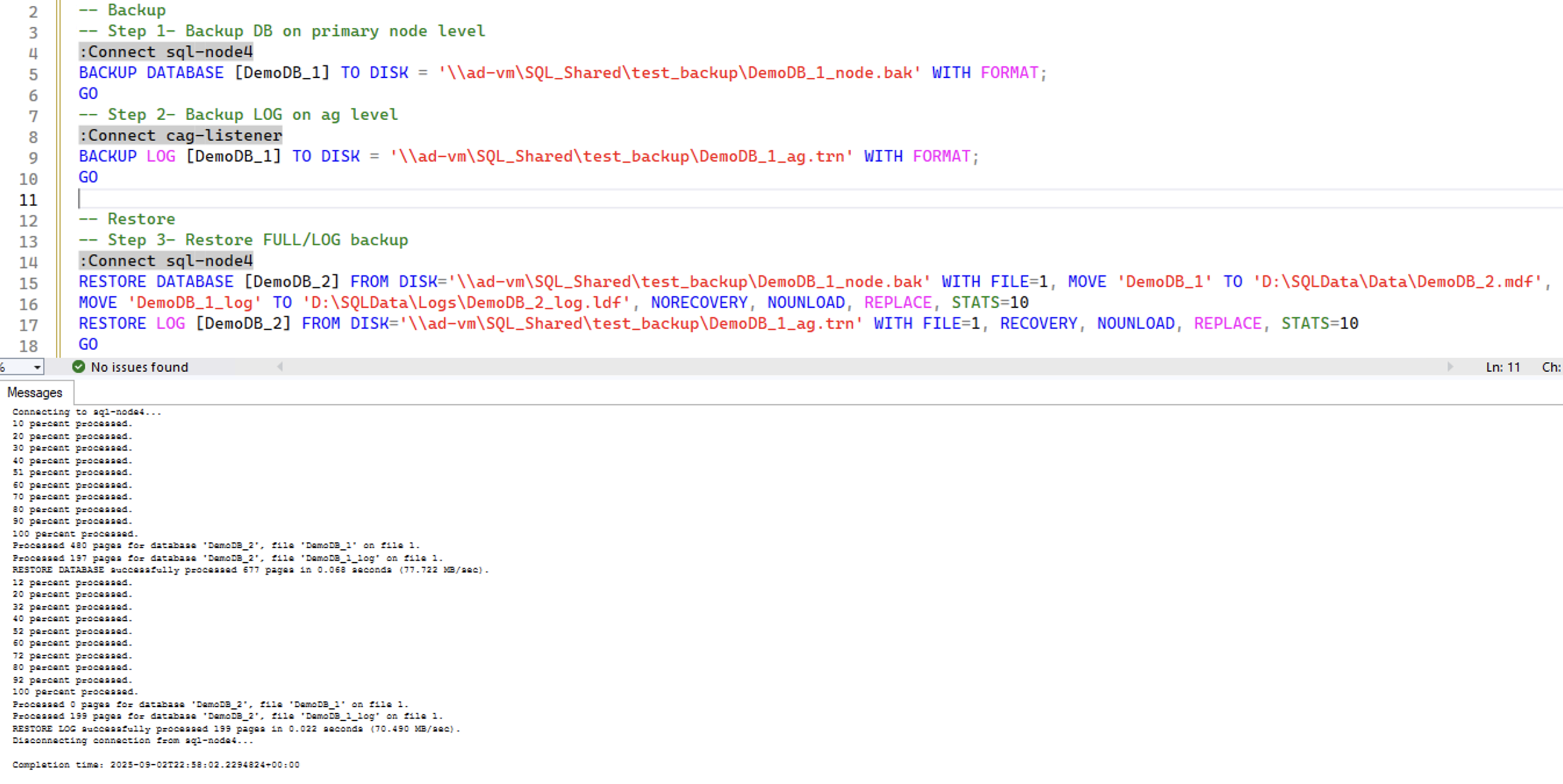
A: No, both backups on instances level and CAG level can work together in a unified single backup chain as the physical LSN will be maintained regardless of the location of the backup operation and regardless the place where the backup metadata is being stored.
So, based on that we can restore a database to a certain point of time while its backup chain contains backup operations performed on nodes level and others performed on CAG level.
However, it is not a good practice to split the backup operations between the node and CAG level as this will break the backup history chain and will lead to more complexity in monitoring backup.
13- Contained Databases Restoration
Q: So how do you actually perform a database restore of a contained database ?
A: This can be done the same way in traditional AGs, restore operation has to be performed on the primary node, then the database has to be added into the contained AG after restoration.
14- Backup Operations Location
Q: Would you recommend database backup jobs be run at the instance or CAG level?
A: A good question, both options can work fine, however I prefer performing backups on CAG level for the following reasons:
- The backup jobs will be highly available and portable, as they are part of the AG and will fail over automatically with the primary replica.
- There will be a separation in backup history metadata between the backup operations for contained AG databases and local databases “the first is being stored in ag_msdb and the second in msdb”.
- All backup history for your AG databases is written to a single, consistent location: the contained
ag_msdb, which will make it much easier and straightforward in monitoring and alerting for your backup health.
15- Multiple CAGs | CDC with Contained AGs
Q: Since the “CAG” prefix seems to be static, is it not possible to have multiple contained AGs at the same time using the same nodes? And with CDC, will the CDC capture and cleanup jobs automatically be created in the CAG msdb?
A: Yes, absolutely. The “cag” prefix is just an example name, it is not a static requirement. You can create multiple Contained Availability Groups on the same set of nodes, and each will have its own uniquely named set of contained system databases (e.g., FinanceAG_master, HR_AG_master).
Regarding CDC, I did not try it on my own, however Microsoft documentation states that the CDC should be configured on contained AG level then the CDC jobs should be created in the CAG msdb.
Link to document: https://learn.microsoft.com/en-us/sql/database-engine/availability-groups/windows/contained-availability-groups-overview?view=sql-server-ver17#change-data-capture
16- Contained AGs & Traditional AGs Together
Q: Can we have both contained and traditional AG?
A: Yes, absolutely. You can have both Contained and Traditional Availability Groups running on the same set of SQL Server instances.
17- Restoration of Contained System Databases
Q: do we need to restore the master and msdb with no recovery on the secondary node?? just like we do for the user databases in Tradional AG?
A: No, you do not need to restore the contained master and msdb on the secondary. The entire process is handled automatically via automatic seeding.
When you create the contained AG, the automatic seeding process takes care of everything, SQL Server automatically creates, backs up, and restores the contained system databases on the secondary replicas in the correct state, ready for synchronization.
18- Initializing “Snapshotting” Contained AG System Databases (1)
Q: I did not hear the answers on the section when snapshotting the systemDB in an CONT_AVG when setting up the CONT_AVG Or Does that get handled as part of creating the CONT_AVG ? . may you repeat the answer ?
A: Yes, the automatic seeding handles the snapshotting for contained AG system databases and there is no need to perform any manual action here.
In case we need to recreate a contained AG again from an old one, we still have the possibility to reuse this old contained AG system databases whether by restoring it on primary node and add it to the AG or by using the SSMS “Reuse System Databases”.

19- Initializing “Snapshotting” Contained AG System Databases (2)
Q: I think you have kind of answered my question eventually. I was asking if when I set CON_AVG for first time, do I need to do anything different for the system databases. I usually restore the DBs manually and I simply ADD it to the AVG.
A: No, you don’t need to do anything different for the contained system databases during the initial setup.
When you execute CREATE AVAILABILITY GROUP with the CONTAINED = ON option, the automatic seeding process is implicitly used to create and synchronize the contained master and msdb on the secondary replicas. This is completely automated.
This is different from your user databases, which you can add to the AG later using your preferred method, whether that’s manual restore or by leveraging automatic seeding.
20- Distributed Availability Group vs. Contained Availability Group
Q: How does a Distributed Availability Group differ from a Contained Availability Group in SQL Server?
A: Distributed Availability Group and Contained Availability Group handle different business needs, DAG simply connects multiple AGs together which located often in different geographical locations for the sake of disaster recovery. While CAG makes a single AG self-sufficient by encapsulating all its dependent objects inside the AG itself.
In SQL Server 2022, we cannot configure distributed availability groups on top of contained availability groups “which is now applicable starting from SQL Server 2025”.
21- Converting Traditional Availability Groups into Contained Availability Groups
Q: Can we add or convert CAG if we have already TAG?
A: Adding new CAGs to a cluster that already have TAGs in place is doable, however the conversion of existing TAG into a CAG is not possible “a new CAG needs to be created and then databases inside the existing TAG need to be migrated into this new CAG”.
22- Orphan Users & Contained AGs (1)
Q: would this take care of the SID mismatch between the master DB and user databasedb for SQL accounts?
A: I would say yes and no, so contained AG has nothing to do with orphan users “in general”, but it still can solve a special case of orphan users “when a database user is mapped to a login that doesn’t exist on a secondary replica”, which is one of the goals of using contained AGs and create contained logins instead of logins on nodes level.
It is also important to make sure that users created on contained AG databases are being mapped to logins created on the contained AG level and not on the nodes level in order to avoid in login/users mismatching “which can lead to orphan users case in the future”.
23- Orphan Users & Contained AGs (2)
Q: I have a question while creating the user via contained ag Listener we are getting orphan user alert?
A: Actually you should create both the server login and its corresponding database users on the contained AG level “while connecting to listener” and not on instance level, this will guarantee that you never have an orphan user alert “because both the login and users belong to the contained AG”.
Final Thoughts
It was an amazing experience to speak at EightKB, and I am really happy with the interaction from the attendees with this big list of smart questions. I hope I managed to answer them all.
If you still have questions, please post them here as a comment, in the EightKB Slack channel, or as a comment on the YouTube session.
BIG THANKS to the EightKB organizers and attendees!!
 SQLSpark - Database & Data Architecture
Leave a comment